Live Webinar · Aug 10Gen AI for In-House Counsel: how we post-train an LLM to run Document Review at under 5¢/document.Save Your Seat →
Blog / AI Contract Review in Microsoft Word: Every Redline in Your Name
Word Add-in Guide
AI Contract Review in Microsoft Word: Every Redline in Your Name
Speed up contract review without giving up control. A step-by-step guide to side-aware review, clause-quoted findings, and tracked changes that go in as your edits, not the tool’s.
Speeding up contract review should not come with concerns about confidentiality and security. Imagine you receive a draft a day before the parties are to sign it, with many other tasks in the pipeline. How do you trust a Word add-in to do the review for you? You might not be able to invest a lot of hours checking for contract risk, marking the whole file, fixing errors, and then taking time out to explain it to the client as well. A little AI help goes a long way in such cases.
Most AI contract review tools offer speed, but the working space is either out of Word or a lot of key findings are missed. To solve this problem, you require a tool that works on your instructions and maintains accuracy while reviewing against standard market positions. The Microsoft Word add-in by DecoverAI is the right fit if you intend to speed up document review without having to worry about the tool being the decision maker instead of you.
AI Contract Review in DecoverAI for Word: A Step-by-Step Guide
Since you are new to the tool and the tool is new to you, this guide will help. A better way to follow along would be to open the Word add-in in an adjacent window and dry-run any contract. For ease of understanding, we will use a fictional broker engagement agreement. Follow these steps to streamline your AI-assisted (and not AI-controlled) contract review process.
1. Choose the side you represent
Open the DecoverAI tab and it will read the names of the parties from the first page. You can get a sharper review by choosing a side: party 1, party 2, or none of them. For each document, you set it once, and it applies to the following:
Reviews
Redlines
Comments
The promise of a market-standard position is best delivered once the tool knows whose side you are on. If you do not pick one, it runs a balanced review and never assumes a side. When we say we do not do anything without your input, we literally mean it. No assumptions about which side you represent, no automated decision-making.
2. Add your deal notes in plain English
Once you have chosen sides, an optional box will appear. Mention anything specific to this particular contract review. A simple rule of thumb: consider that you are briefing an associate. For instance, in our fictional broker engagement agreement: “Broker must be registered in OR and WA before any placement” or “no exclusivity beyond 12 months”. Each line becomes a check for your contract review process. The review will then measure the contract against two things:
Standard positions for that agreement, and
Your instructions.
You are covered as long as your contract review instructions are clear. Nothing will be tweaked without your input.
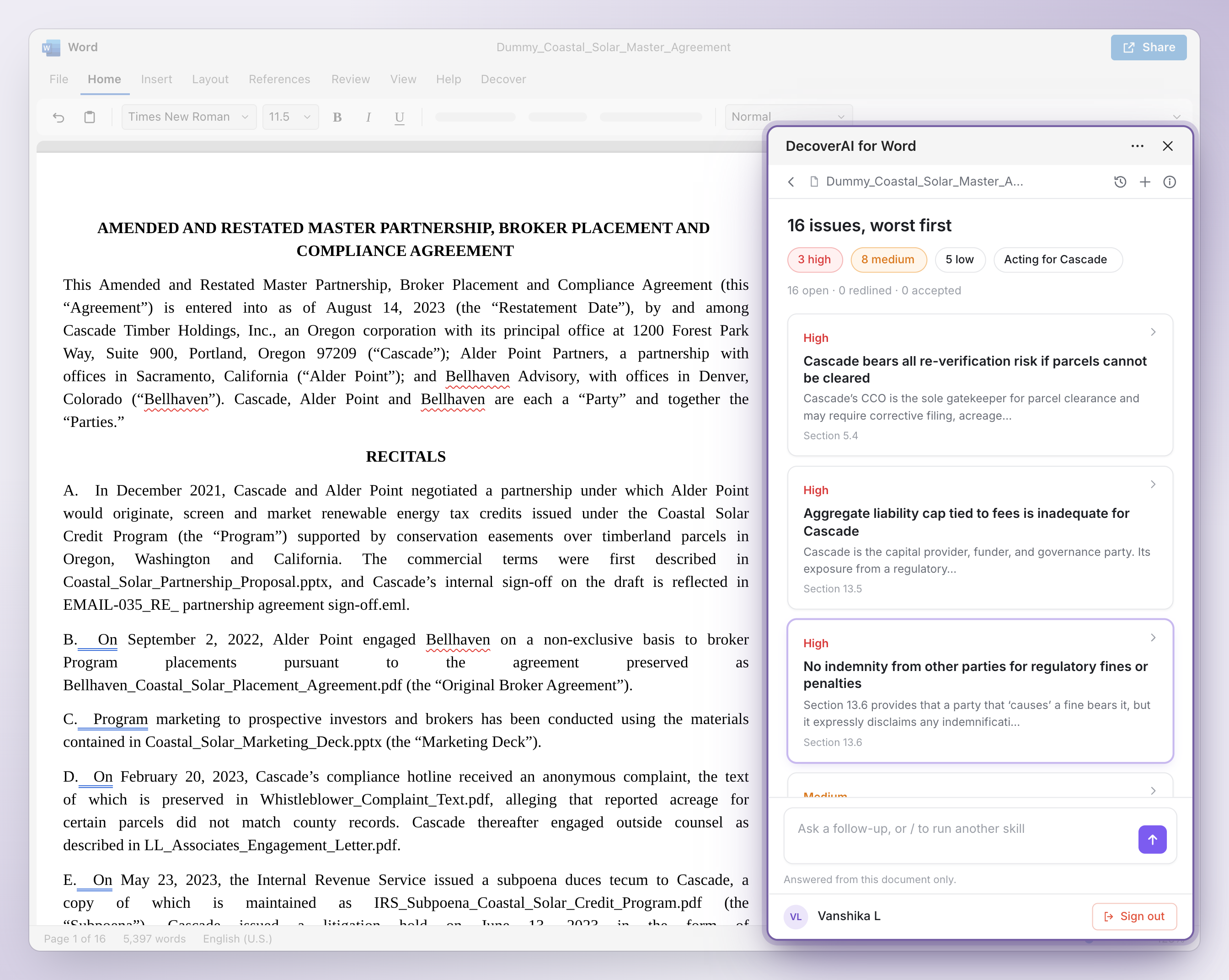
3. See issues ranked worst first, with the clause quoted
Imagine your DecoverAI review gives you five issues: two high, two medium, and one low. For all these findings, you can confirm each one quickly as you will get the following:
The clause number
The clause
The “show in the document” link (that takes you to the exact clause in Word)
Issues are ranked by severity: high, medium, low. If a clause you asked for is not there, it will not be manufactured or assumed. We will flag the gap by saying “not present.” Any issue tied to your instruction is tagged under “Your instruction,” so you can see which ones come from your brief.
Figure 1: Issues ranked worst first, each with the clause quoted and a “show in document” link.
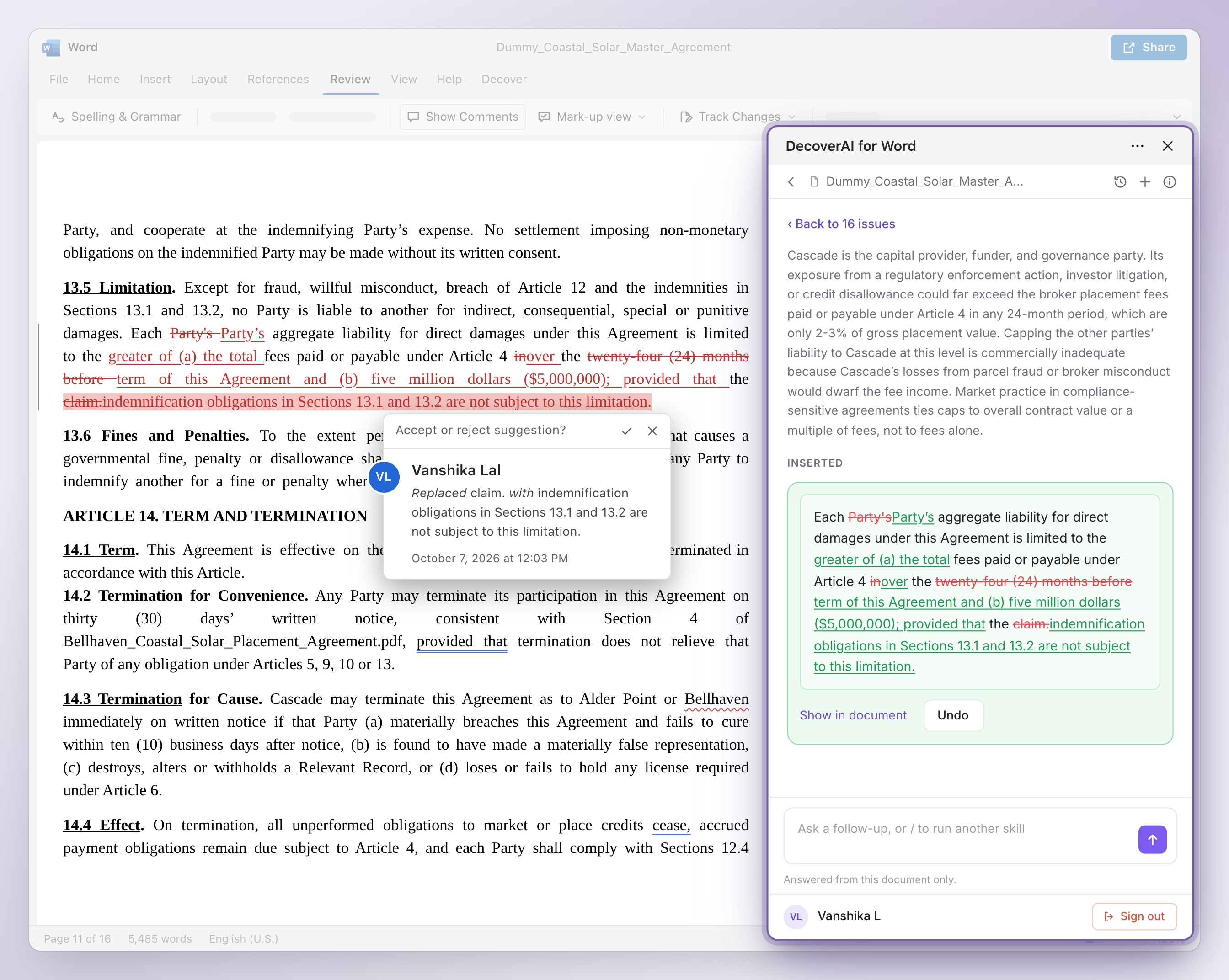
4. Insert the fix as a tracked change in your name
You can open any issue and do the following:
See what the contract says
Check why it matters
See your instruction
Find a suggested new clause with a new clause number (if required)
You can either use the new clause as-is or edit the wording to suit the needs of your review. How will it show up? As an ordinary tracked change authored by you (the signed-in Word user). DecoverAI does not appear anywhere in the document, even if the clause is suggested by it. You can then:
“Accept” or “Reject” it as you would any tracked change in Word
Remove a redline inserted by the panel using Undo in the DecoverAI panel, so your issue list stays up to date
Old wine in a new bottle. Contract redlining as you have always done it. With DecoverAI, you just get a better first draft, and the review process gets a little less troublesome with each instruction from your end.
Figure 2: The suggested fix inserted as a tracked change in your name, not the tool’s.
5. Dismiss what the client has accepted, with a reason
In the broker example, some flags might be acceptable for the deal at hand (for instance, the 12-month termination lock). You can:
Dismiss it
Choose a reason
Add a note
Imagine the client asks you next year why they accepted that change after the review. Instead of putting in the mental effort all over again, you can just click on it and find the reason attached. This is how simple the workflow would be, even after the review is over. And remember: the contract is not stored on the DecoverAI database, but you will not lose the work done on the document either.
How does DecoverAI for Word ensure Confidentiality and Security?
You should read a vendor’s terms before letting an AI contract review tool process your contracts. Here is what ours say:
DecoverAI reads the open document only when you run a skill that needs it.
Your documents are never used to train, fine-tune, or improve AI models.
Data is encrypted with AES-256 at rest and TLS 1.2+ in transit.
DecoverAI is SOC 2 Type II certified and hosted in the US. Full details are in our Trust Center.
How does DecoverAI for Word make Client Briefing Easier?
Contract review does not end when you reach the last clause. The aftermath is shaped by the quality of your review. You might need to prove to the client that your review will help them. How do you do so without re-reading between the lines repeatedly? We give you the following to ensure client briefing is not something to stress about.
Honest Answers: Clause or “Not Present”
If you ask in the prompt box, “Did party A talk about out of court settlement?” you will get a short answer. That answer will include:
The relevant clause
The “show in document” link that takes you to the exact clause
If not found: a card that says “not present in this document”
Additionally, if the contract you are reviewing is part of a DecoverAI matter, you can parse through related documents as well, for instance an email discussing the same court settlement. This allows you to bring the entire Matter Intelligence database (even 100 GB+) into the MS Word ecosystem. You can draft the motion, fact-check against an exhibit, or look up a discovery document, all in a single query, without leaving Word.
How DecoverAI Compares to Other AI Contract Review Software
Several AI contract review software tools now work inside Word, and most put their AI redlining edits in tracked changes. Here is where we differ, based on each vendor’s public materials (to the best of our understanding):
DecoverAI
Spellbook
GC AI
Claude for Word
Asks which side you represent
✓ Optional — defaults to balanced
Yes
In playbook setup
No
Every finding quotes the clause
✓ Clause + “show in document” link
Clause references
Exact quote
Prose summary
Flags missing clauses as “not present”
✓ Yes
Partly
“Not addressed”
No
Dismiss a finding with a recorded reason
✓ Yes, reason logged
Learns from dismissals; no reason recorded
No
No
Saved playbooks
Next release
Yes
Yes
Generic skills
Figure 3: Feature comparison based on each vendor’s public materials.
Try the Word add-in on your next contract
Side-aware review, clause-quoted findings, and tracked changes in your name, without leaving Word.
What does Version 1 of the DecoverAI Word Add-in not do yet?
Attorneys love honesty, and we love to be honest. Saving legal playbooks is not on the table yet, and our team is working on it as you read this. Version 1 reviews against standard market positions, giving the highest importance to your input. It does not benchmark terms against market data yet. You may be able to review several documents at once in the second version, and there is much more in store. For now, tabular review allows you to handle multiple documents. Feel free to experiment with Version 1 and make your contract review journey more streamlined.
Frequently Asked Questions
What is AI contract review in Microsoft Word?
AI contract review in Microsoft Word uses an add-in to read the contract you have open, flag risks, and suggest fixes without leaving Word. DecoverAI for Word lets you set which party you represent and checks the contract against standard market positions plus your own instructions. It ranks issues by severity and quotes the clause and a “show in document” link for every finding. Suggested fixes go in as tracked changes in your name, and nothing changes until you click.
Can AI contract review catch missing clauses?
Yes. DecoverAI for Word flags a clause that is not in the contract as “not present” instead of skipping it. If you ask for a protection, such as a broker registration warranty, and the contract does not have one, the gap is ranked alongside the other issues. You can then insert a suggested new clause as a tracked change. Missing clauses are among the easiest issues to overlook in a manual read.
Is AI contract review safe for confidential client documents?
That depends on the vendor’s terms, which ABA Formal Opinion 512 tells lawyers to read before using an AI tool. DecoverAI for Word reads the open document only when you run a skill that needs it. Your documents are never used to train AI models, and data is encrypted with AES-256 at rest and TLS 1.2+ in transit. DecoverAI is SOC 2 Type II certified and hosted in the US.
Does AI contract review replace a lawyer’s judgment?
No. Under ABA Formal Opinion 512, lawyers remain responsible for AI output. DecoverAI for Word is built so you can verify every finding: each one quotes the clause and a “show in document” link, and every edit is a tracked change authored in your name. When you dismiss an issue, the reason is recorded, so every decision is yours and documented.
What should lawyers look for in an AI contract review tool for Word?
Look for six things: it asks which party you represent; it quotes the clause for every finding; it flags missing clauses; it inserts edits as tracked changes in your name; it records why an issue was dismissed; and it states its data terms plainly. DecoverAI for Word does all six. Saved playbooks are planned for the next release.
Conclusion: DecoverAI for Word Lets You Check Every Finding
AI contract review helps attorneys only if it is verifiable. ABA Formal Opinion 512 keeps attorneys accountable for AI output. To ensure you do not land in legal trouble, DecoverAI ensures the following:
Not a single change in the document without an overt input or click from your side.
Named edits and comments: your ideas, your name.
If we find something, we will quote the exact clause. If the clause is not part of the contract, we will tell you it is “not present.” No fabricated evidence, no manufactured clauses.
If a dismissal is there, it will have a reason attached to it.
The intention is not to replace your judgment, since that is best done by an attorney, but to speed up your first pass and make your file easier to defend. DecoverAI for Word runs in Word for Microsoft 365 on Windows and Mac, as well as Word on the web. Make your legal workflow smooth, without complicating the output.
Book a demo with us and we will be happy to run a tailored review on one of your standard contract types.
“DecoverAI has been a great asset in helping our firm become more efficient, productive, and thorough. I’d recommend DecoverAI to any firm looking to save time and grow efficiency.”
This article is general information about legal technology and contract review practice, not legal advice for any particular matter. Obligations relating to attorney responsibility for AI-assisted review vary by jurisdiction and bar authority.
About the Author
Paridhi Mehrotra
Attorney, DecoverAI
Paridhi Mehrotra is an attorney and legal writer on the DecoverAI team, where she writes about AI-assisted eDiscovery, document review, and defensible discovery practice. Her legal work spans corporate law, intellectual property, cyber law, and data privacy, including high-volume contract review for multinational clients and litigation.